0 ratings

Item #:
120729291
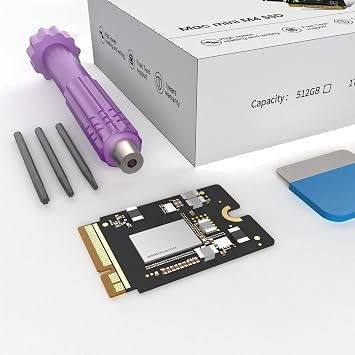
Mac mini M4 1TB SSD Upgrade Internal NVMe Hard Drive Replacement Kit for Mac mini M4, DIY Storage Expansion Solution 1, TB
Item #:
120729291
RWF 464416
Price Details
Excluding Shipping & Custom charges ( Shipping and custom charges will be calculated on checkout )
*All items will import from US
0 ratings
Write a review
Out of stock
 Imported from USA store
Secured transaction
Ubuy works hard to protect your security and privacy. Our advanced payment security system ensures confidentiality by encrypting your information during transmission using AES (Advanced Encryption Standards) and SSL (Secure Socket Layer) protocols. Your payment details are 100% secure as we do not share your payment details with third party sellers.
Our Top Logistics Partners


This 2TB SSD, designed for the Mac Mini, offers massive storage for files, apps, and media.

Fast
Shipping

Free
Return*

Secure Packaging

100% Original Products

PCI DSS Compliance

ISO 27001 Certified


Note: Step Down Voltage Transformer required for using electronics products of US store (110-120). Recommended power converters Buy Now.


What Stands Out
High Storage Capacity
The 2025 M4 Macmini offers a substantial 2TB SSD upgrade, catering to users needing extensive storage for large files, projects, and applications without the hassle of external drives.
Enhanced Performance
This Macmini model is engineered for optimal performance, ensuring faster processing speeds for demanding tasks, making it ideal for creative professionals and heavy multitaskers.
Seamless Upgrade
The SSD replacement is designed for easy installation, allowing users to quickly upgrade their devices without extensive technical knowledge, enhancing user experience and satisfaction.
Product Details
| Item Weight | 0.5 lbs (230 grams) |
Who Should Buy?

-
Creative Professionals
Ideal for graphic designers and video editors needing fast access to large files and improved performance.
-
Gamers
Enhances gaming experience by providing faster load times and ample storage for numerous game titles.
-
Tech Enthusiasts
Perfect for users who want to upgrade their Mac mini with higher capacity and speed for multitasking.

-
Casual Users
Basic tasks like browsing or document editing do not require such high storage or processing capabilities.
-
Budget-Conscious Shoppers
May not be a cost-effective choice for those seeking lower-priced, lower-capacity storage options.
-
Occasional Gamers
Not suitable for users who play games infrequently and do not need extensive storage or speed enhancements.
Product Description
Mac mini M4 1TB SSD Upgrade Internal NVMe Hard Drive Replacement Kit for Mac mini M4, DIY Storage Expansion Solution 1, TB
Have any Query? Chat with us
Customer Questions & Answers
-
Question:
What is the difference between the 2TB and 1TB SSD options for the 2025 M4 Mac Mini?
Answer: The primary difference lies in storage capacity. The 2TB SSD option provides double the space compared to the 1TB variant, allowing users to store more applications, files, and high-resolution media. This becomes particularly beneficial for professionals in graphic design, video editing, or those who require extensive data storage for large projects. Choosing the right size is crucial based on your usage; for instance, gamers or content creators would likely prefer the 2TB option for ample space. -
Question:
Can I install the 2TB SSD replacement myself in the 2025 M4 Mac Mini?
Answer: Yes, installing a 2TB SSD replacement in the 2025 M4 Mac Mini can be done by individuals with basic technical skills. You'll need specific tools and follow a guide to access the internal components of the Mac Mini safely. This upgrade enhances performance significantly, especially for users who multitask or run heavy applications. However, if you're unsure, consulting a technician is a prudent choice to prevent any potential harm to the device. -
Question:
Is the 2TB SSD replacement compatible with all versions of the 2025 M4 Mac Mini?
Answer: The 2TB SSD replacement is specifically designed for the 2025 M4 Mac Mini. Before making a purchase, it's advisable to confirm compatibility by checking the specifications of your model. This compatibility ensures that you experience optimal performance and efficient data management. For example, users with the higher-end models will benefit from faster read and write speeds, crucial for demanding applications. -
Question:
What performance improvements can I expect from upgrading to a 2TB SSD?
Answer: Upgrading to a 2TB SSD can significantly enhance your Mac Mini's overall performance, including faster boot times, quicker application launches, and improved data transfer speeds. This is particularly noticeable for users who work with large files or complex software. For instance, a video editor might experience smoother playback and rendering times, greatly enhancing productivity. The additional storage also alleviates performance slowdowns associated with low disk space. -
Question:
Are there any brands recommended for a 2TB SSD replacement for the 2025 M4 Mac Mini?
Answer: Top brands like Samsung and Crucial are highly regarded for SSD replacements for the 2025 M4 Mac Mini. These brands are known for their reliability, performance, and quality of storage products. Selecting a reputable brand helps ensure that you receive a durable and efficient SSD, which is essential for preserving your data and providing consistent performance. For professionals, investing in a high-quality SSD can lead to long-term benefits and enhanced user experience. -
Question:
What tools do I need to replace the SSD in a 2025 M4 Mac Mini?
Answer: Replacing the SSD in a 2025 M4 Mac Mini typically requires a Torx screwdriver, a suction cup, and an anti-static wrist strap to prevent damage from static electricity. These tools facilitate safe access to the internal components, allowing you to complete the upgrade without mishaps. Ensuring you have the right equipment not only simplifies the procedure but also promotes safety throughout the installation process, ensuring your Mac Mini functions optimally post-upgrade. -
Question:
Can a 2TB SSD help with data security on my Mac Mini?
Answer: Yes, a 2TB SSD can enhance data security indirectly by providing ample space for regular backups and storage of essential files. Storing backups on a separate SSD reduces the risk of data loss due to hardware failure. Furthermore, SSDs typically offer encryption features that can safeguard sensitive information against unauthorized access. For users concerned about data integrity and security, investing in a quality SSD is a practical and proactive measure. -
Question:
What are the best use cases for a 2TB SSD in a Mac Mini?
Answer: A 2TB SSD is ideal for video editors, graphic designers, and gamers who require substantial storage for large files and applications. Professionals using resource-intensive software will find the extra space enhances their workflow efficiency and minimizes lag. Additionally, individuals who enjoy storing a vast library of games or multimedia content can benefit significantly, ensuring that their system runs smoothly without storage constraints. Overall, this upgrade fosters a better user experience across various professional and personal tasks. -
Question:
How does the 2TB SSD upgrade affect battery life on Mac Mini?
Answer: The SSD upgrade itself does not directly impact battery life, as the Mac Mini is typically connected to power. However, SSDs are generally more energy-efficient compared to traditional hard drives, which means less heat is generated, leading to improved overall system performance. For users performing data-intensive tasks, this efficiency can create a more comfortable operating environment and potentially extend the lifespan of the system. Consequently, while there may not be a direct correlation to battery life, overall efficiency is enhanced. -
Question:
Where can I buy the 2025 M4 Mac Mini 2TB SSD replacement in Rwanda?
Answer: You can purchase the 2025 M4 Mac Mini 2TB SSD replacement from Ubuy. Ubuy offers a wide selection of tech products and accessories, making it a convenient platform for purchasing your SSD upgrade. Their user-friendly interface also allows for easy navigation and comparison of various options available, ensuring that you find the right SSD to meet your needs efficiently.
wusheation Editorial Review
No editorial reviews found
Customer Reviews & Ratings
1 customers ratings
-
5 Star
100%
-
4 Star
0%
-
3 Star
0%
-
2 Star
0%
-
1 Star
0%
Review this product
Share your thoughts with other customers
Product Price History
Important information
- Limitations : For products shipped internationally, please note that any manufacturer warranty may not be valid; manufacturer service options may not be available; product manuals, instructions, and safety warnings may not be in destination country languages; the products (and accompanying materials) may not be designed in accordance with destination country standards, specifications, and labeling requirements; and the products may not conform to destination country voltage and other electrical standards (requiring use of an adapter or converter if appropriate). The recipient is responsible for assuring that the product can be lawfully imported to the destination country. When ordering from Ubuy or its affiliates, the recipient is the importer of record and must comply with all laws and regulations of the destination country.
- Not all the products listed on Ubuy are for sale, as Ubuy is a global search engine. Products are subject to export/trade regulations.
RWF 464416
Currently unavailable.
We don't know when or if this item will be back in stock.
This item is not restrict in my country.(Please click on above link if this item is not restrict in your country, So our team will review and allow.)
Secured transaction
Ubuy works hard to protect your security and privacy. Our advanced payment security system ensures confidentiality by encrypting your information during transmission using AES (Advanced Encryption Standards) and SSL (Secure Socket Layer) protocols. Your payment details are 100% secure as we do not share your payment details with third party sellers.
Our Top Logistics Partners
Fastest cross-border delivery
Features & Benefits
- Large 2TB capacity for extensive file storage.
- High-speed read/write speeds up to 3300 MB/s.
- Custom-designed M4 NVMe SSD for perfect compatibility.
- Seamless integration with Mac Mini M4.
- Rigorously tested for reliability and stability.
- Enhances boot times and app performance.