- Home Page /
- Electronics /
- Computer Accessories /
- Computer Accessories & Peripherals /
- Keyboards, Mice & Accessories /
- Computer Keyboards /
- Microsoft Surface Pro Signature Keyboard - Bl...
0 ratings



Item #:
40644082
Microsoft Surface Pro Signature Keyboard - Black
Item #:
40644082
RWF 267376
Price Details
Excluding Shipping & Custom charges ( Shipping and custom charges will be calculated on checkout )
*All items will import from US
In stock
 Imported from USA store
QTY:
Order now and get it around Wednesday, July 08
Secured transaction
Ubuy works hard to protect your security and privacy. Our advanced payment security system ensures confidentiality by encrypting your information during transmission using AES (Advanced Encryption Standards) and SSL (Secure Socket Layer) protocols. Your payment details are 100% secure as we do not share your payment details with third party sellers.
Our Top Logistics Partners


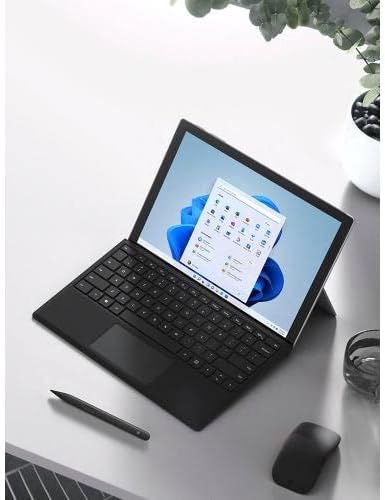
Next-level versatility comes in the perfect, premium keyboard, featuring a large glass trackpad and luxurious, Alcantara® material covering.

Fast
Shipping

Free
Return*

Secure Packaging

100% Original Products

PCI DSS Compliance

ISO 27001 Certified


Note: Step Down Voltage Transformer required for using electronics products of US store (110-120). Recommended power converters Buy Now.


What Stands Out
Premium Material
Crafted with luxurious Alcantara fabric, the Surface Pro Signature Keyboard offers a sophisticated touch while ensuring durability and comfort for seamless typing experiences.
Versatile Design
Designed to transform your Surface Pro into a laptop, this keyboard features adjustable angles, providing flexibility for various usage scenarios, enhancing productivity whether at a desk or on the go.
Enhanced Typing
With a full-sized, backlit keyboard, enjoy responsive keystrokes and visibility in low-light conditions, making it ideal for work, study, or creative pursuits at any time of day.
Product Details
- Choose your keyboard color: Poppy Red, Ice Blue, Platinum, and Black. (1)
- Features a full mechanical keyset, backlit keys, and large trackpad for precise navigation and control.
- Typing and writing in one without the bulk, Surface Pro Signature Keyboard delivers fast and accurate typing like a traditional, full-size keyboard, plus natural on-screen writing with Surface Slim Pen 2 (sold separately).
- Work your way anywhere. Surface Pro Signature Keyboard clicks into place instantly and stays securely attached so you always have your pen and keyboard with you. Use with Surface Pro 8 or Pro X Kickstand for a full laptop experience.
- Close to protect screen and conserve battery, or fold back completely for a tablet.
| Compatible Devices | Surface Pro 8, Surface Pro X |
| Connectivity Technology | Bluetooth, wireless |
| Additional Features | Magnetic |
| Keyboard Backlighting Color Support | Single Color |
| Power Source | Battery Powered |
| Switch Type | Mechanical |
| Keyboard Layout | QWERTY |
| Hand Orientation | Ambidextrous |
| Button Quantity | 104 |
| Minimum Required Operating System Version | Windows 10 |
| Compatible Operating System Family | Windows |
| Compatible Tablet Computer Models | Microsoft Surface Pro 8, Microsoft Surface Pro X |
| Number of Keys | 78 |
| Number of Sections | 2 |
| Color | Black |
| Style Name | Contemporary |
| Item Dimensions L x W x H | 12.53"L x 10.01"W x 0.7"H (31.8 x 25.4 x 1.8 cm) |
| Enclosure Material | fabric |
| Brand | Microsoft |
| Keyboard Description | Mechanical |
| Antenna Location | Office |
| Built-In Media | Surface Pro Keyboard |
| Model Number | 8XA00001 |
| Series Number | 889842779660 |
| Global Trade Identification Number | 00889842779660 |
| Unit Count | 1.0 Count |
| Manufacturer | Microsoft |
| UPC | 889842779660 |
| Mfr Part Number | 8XA-00001 |
| Item Weight | 1.1 Pounds (500 grams) |
| Recommended Uses For Product | Office |
| Special Feature | Magnetic |
| Keyboard backlighting color support | Single Color |
| Style | Contemporary |
| Product Dimensions (L x W x H) | 12.53"L x 10.01"W x 0.7"H (31.8 x 25.4 x 1.8 cm) |
| Package Weight | 2.5 Pound |
What's in the box
Surface Pro Keyboard
Who Should Buy?

-
Professionals
Ideal for business users needing a reliable, portable keyboard for extensive typing and productivity on the go.
-
Students
A great choice for students who require a versatile keyboard for note-taking and coursework on their Surface Pro.
-
Travelers
Perfect for travelers looking for a lightweight, compact keyboard that enhances the versatility of their Surface device.

-
Gamers
Not suitable for gamers seeking high-performance keyboards with customizable keys and advanced features for gaming.
-
Heavy Typists
May not meet preferences of those who type extensively and prefer more mechanical feedback and tactile response from keyboards.
-
Budget Users
Less ideal for budget-conscious consumers looking for inexpensive keyboard options without compromising on features.
Product Description
Have any Query? Chat with us
Related Searches
Customer Questions & Answers
-
Question:
What features does the Microsoft Surface Pro Signature Keyboard - Black have?
Answer: The Microsoft Surface Pro Signature Keyboard - Black offers a premium typing experience with its luxurious Alcantara material and optimized key travel. This keyboard is designed for the Surface Pro devices, providing a seamless connection that enhances productivity. The backlit keys allow for comfortable typing in low-light environments, making it ideal for late-night work sessions or study. Moreover, the integrated touchpad adds precision and ease for navigating your device, making it a perfect companion for both office work and casual use. -
Question:
Is the Microsoft Surface Pro Signature Keyboard - Black compatible with all Surface Pro models?
Answer: The Microsoft Surface Pro Signature Keyboard - Black is specifically designed for compatibility with Surface Pro 7, Surface Pro X, and Surface Pro 8. While it may physically attach to other models in the Surface range, features such as the touchpad functionality and specific key functions may vary. Thus, it’s essential to ensure that your Surface device belongs to the mentioned models to fully utilize its capabilities and get the best user experience. -
Question:
How does the battery life of the Microsoft Surface Pro Signature Keyboard - Black work?
Answer: The Microsoft Surface Pro Signature Keyboard - Black does not use a separate battery. Instead, it draws power from the Surface Pro device itself when it's connected. As a result, you won’t have to worry about charging it separately. This design offers convenience while keeping your workspace clutter-free. Users can expect uninterrupted productivity without the hassle of managing additional power sources. -
Question:
Can I use the Microsoft Surface Pro Signature Keyboard - Black with other devices?
Answer: While the Microsoft Surface Pro Signature Keyboard - Black is primarily designed for Surface Pro devices, its connection to other devices such as laptops or tablets is limited. The keyboard uses a specific connector that is optimized for compatible Surface devices. Therefore, the best performance and all features are harnessed when used with the intended Surface Pro models, ensuring that your typing experience is seamless and highly functional. -
Question:
What is the build quality of the Microsoft Surface Pro Signature Keyboard - Black?
Answer: The Microsoft Surface Pro Signature Keyboard - Black features a high-quality build with premium Alcantara fabric which is soft to the touch and durable. This material not only enhances its aesthetic appeal but is also resilient against wear and tear. Designed for everyday use, the keyboard withstands typical usage scenarios, whether it’s for professional typing or casual browsing, assuring lasting performance and style. -
Question:
Does the Microsoft Surface Pro Signature Keyboard - Black have adjustable backlighting?
Answer: Yes, the Microsoft Surface Pro Signature Keyboard - Black features adjustable backlighting that allows you to customize the brightness according to your preference. This feature is particularly useful for working in dimly lit environments, as it provides better visibility of keys while typing. Users can enjoy their device in various lighting conditions, making it a versatile choice for both office and home settings. -
Question:
How do I clean the Microsoft Surface Pro Signature Keyboard - Black?
Answer: To clean the Microsoft Surface Pro Signature Keyboard - Black, you can simply use a soft, damp cloth to wipe away dirt and smudges. For deeper cleaning, a mild soap solution works effectively on the Alcantara material. Ensure that you gently rub the surface to avoid damage. Regularly maintaining the keyboard not only keeps it looking pristine but also ensures optimal functionality over time, making it a smart choice for those who wish to preserve their tech. -
Question:
What typing experience can I expect with the Microsoft Surface Pro Signature Keyboard - Black?
Answer: The typing experience on the Microsoft Surface Pro Signature Keyboard - Black is designed to be comfortable and responsive. With well-spaced keys and a satisfying tactile feel, it is perfect for extended typing sessions, whether you’re drafting documents, programming, or chatting online. The sophisticated design improves ergonomics and reduces fatigue, making it ideal for professionals and students alike who demand performance in their tools. -
Question:
How does the touchpad on the Microsoft Surface Pro Signature Keyboard - Black function?
Answer: The touchpad on the Microsoft Surface Pro Signature Keyboard - Black is large and responsive, enhancing navigation without needing an external mouse. It supports multi-touch gestures, allowing for seamless scrolling, zooming, and executing commands with ease. This feature is particularly useful in mobile environments or when space is limited, empowering users to navigate their Surface Pro device efficiently during both work and leisure activities. -
Question:
Where can I buy Microsoft Surface Pro Signature Keyboard - Black in Rwanda?
Answer: You can purchase the Microsoft Surface Pro Signature Keyboard - Black directly from Ubuy in Rwanda. Ubuy offers a wide selection of tech accessories, ensuring you can find the specific model you need for your Surface Pro device, alongside excellent customer service to assist with your shopping experience.
Microsoft Keyboards 8XA00001 Editorial Review



If you are looking for a keyboard for your Surface Pro X or Surface Pro 8, the Microsoft Surface Pro Signature Keyboard is an option worth Considering. It features a slim and lightweight design that easily connects to your device and provides a comfortable typing experience. With its built-in magnets, you can securely store your Surface Slim Pen 2 when not in use. However, keep in mind that this keyboard is not compatible with earlier versions of Surface Pro, including the Surface Pro 7.
Customer Reviews & Ratings
1262 customers ratings
-
5 Star
76%
-
4 Star
11%
-
3 Star
4%
-
2 Star
1%
-
1 Star
8%
Review this product
Share your thoughts with other customers
Pros
- Slim and lightweight design
- Comfortable typing experience
- Built-in magnet for Surface Slim Pen 2 storage
Cons
- Only compatible with Surface Pro X and Surface Pro 8
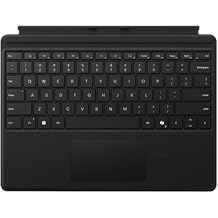
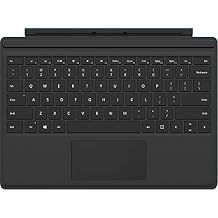
Top selling Surface Pro Keyboard in Finland





Last Updated on June 8, 2026
Product Price History
Important information
- Limitations : For products shipped internationally, please note that any manufacturer warranty may not be valid; manufacturer service options may not be available; product manuals, instructions, and safety warnings may not be in destination country languages; the products (and accompanying materials) may not be designed in accordance with destination country standards, specifications, and labeling requirements; and the products may not conform to destination country voltage and other electrical standards (requiring use of an adapter or converter if appropriate). The recipient is responsible for assuring that the product can be lawfully imported to the destination country. When ordering from Ubuy or its affiliates, the recipient is the importer of record and must comply with all laws and regulations of the destination country.
- Not all the products listed on Ubuy are for sale, as Ubuy is a global search engine. Products are subject to export/trade regulations.
RWF 267376
Order now and get it around Wednesday, July 08
This item is not restrict in my country.(Please click on above link if this item is not restrict in your country, So our team will review and allow.)
QTY:
Secured transaction
Ubuy works hard to protect your security and privacy. Our advanced payment security system ensures confidentiality by encrypting your information during transmission using AES (Advanced Encryption Standards) and SSL (Secure Socket Layer) protocols. Your payment details are 100% secure as we do not share your payment details with third party sellers.
Our Top Logistics Partners
Fastest cross-border delivery
Features & Benefits
- Features full mechanical keyset, backlit keys, and large trackpad
- Delivers fast and accurate typing like a traditional, full-size keyboard
- Natural on-screen writing with Surface Slim Pen 2 (sold separately)
- Clicks into place instantly and stays securely attached
- Use with Surface Pro 8 or Pro X Kickstand for a full laptop experience
- Close to protect screen and conserve battery, or fold back completely for a tablet